

Guide To Meta Partnership Ads: What’s New, Why It Matters, and How to Set Them Up
Meta Partnership Ads in 2025 help brands run ads through creators or partners. Here’s what’s new, why it matters, and how to set them up.
Table of Contents
What Are Meta Partnership Ads?
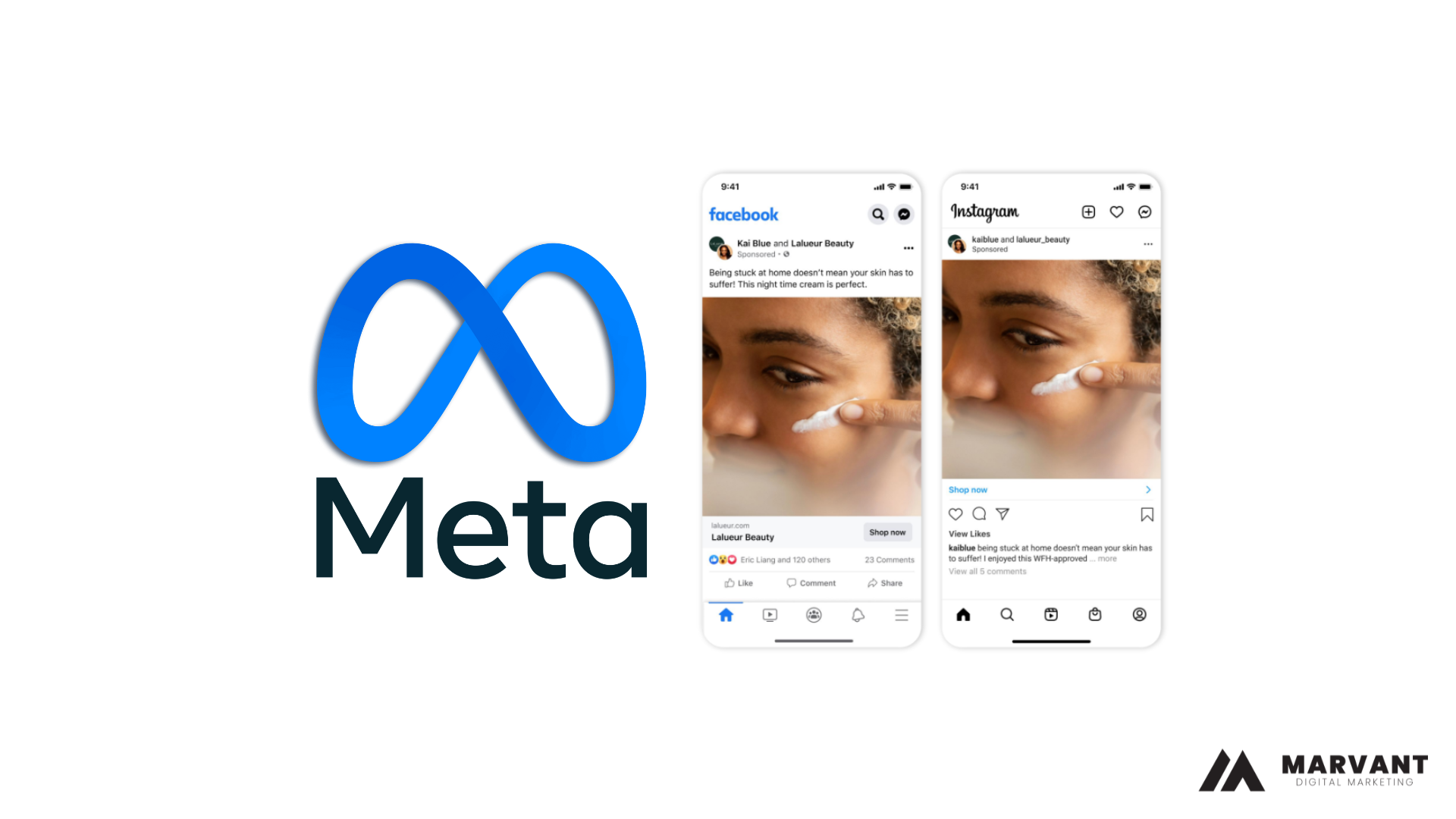
Partnership ads allow you to run ads from a creator or other partner’s handle to scale your collaborations. Incorporating partnership ads into your business-as-usual campaigns is the most performant way to run creator content on our platforms.
• Uses signals from both creator and brand handles for stronger ranking and performance
• Ensures partnership transparency
• Recent updates have made partnership ads simpler and more functional
What’s New in 2025?
- Simpler Workflow → Creators can now grant ad permissions with one click, making collaborations smoother.
- Cross-Platform Integration → Ads can run seamlessly across Facebook, Instagram, Reels, and Stories.
- More Transparent Labels → Users see “Sponsored in partnership with [brand]” for better trust.
- Expanded Access → Partnership Ads are no longer limited to big brands — SMEs in Malaysia can easily use them with micro-influencers or KOCs.
Better Reporting → Brands can track results like ROAS, engagement, and reach directly inside Ads Manager.
Why Meta Partnership Ads Matter in 2025
- Higher Trust → Audiences are more likely to engage with ads from creators they already follow.
- Native Feel → Partnership Ads blend into the feed, looking more like regular posts than traditional ads.
- Better ROAS → Businesses often see lower CPMs and higher conversions compared to standard brand ads.
- Scalable for SMEs → Even small budgets can go further when ads come from micro-influencers or KOCs.
Great for Malaysia’s Market → Since Malaysians rely heavily on peer reviews and social proof, running ads via creators resonates strongly.
How to Set Up Meta Partnership Ads (Step by Step)
Option 1. Account-Level Permissions (Advertiser-initiated)
Advertisers can request account-level partnership ad permissions from their partners in Meta Business Suite. Account-level permissions provide advertisers with the most control over what content they can run as partnership ads from their partner’s handle.
Advertisers can:
• Create ads from a partner’s handle without a pre-existing post.
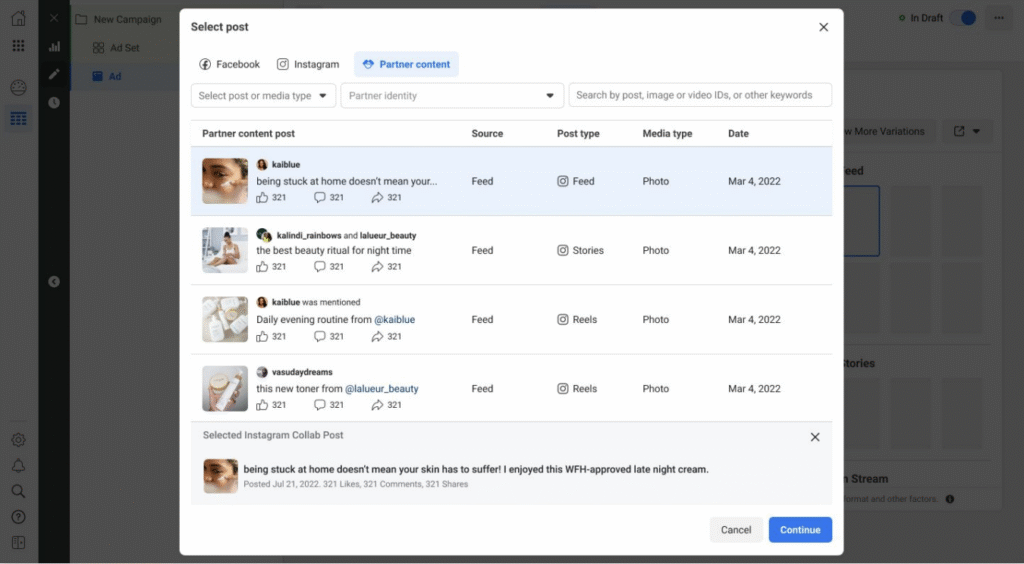
• Create ads from any of the partner’s existing posts that tag the advertiser. Note: the advertiser must be tagged using the paid partnership label on Facebook, or in the paid partnership label, an @mention, a people tag, a product tag, or a Collab on Instagram.
• Include or exclude their partner’s custom audience in their partnership ad campaign.
Partners can:
Tag the advertiser using the paid partnership label when making branded content posts.
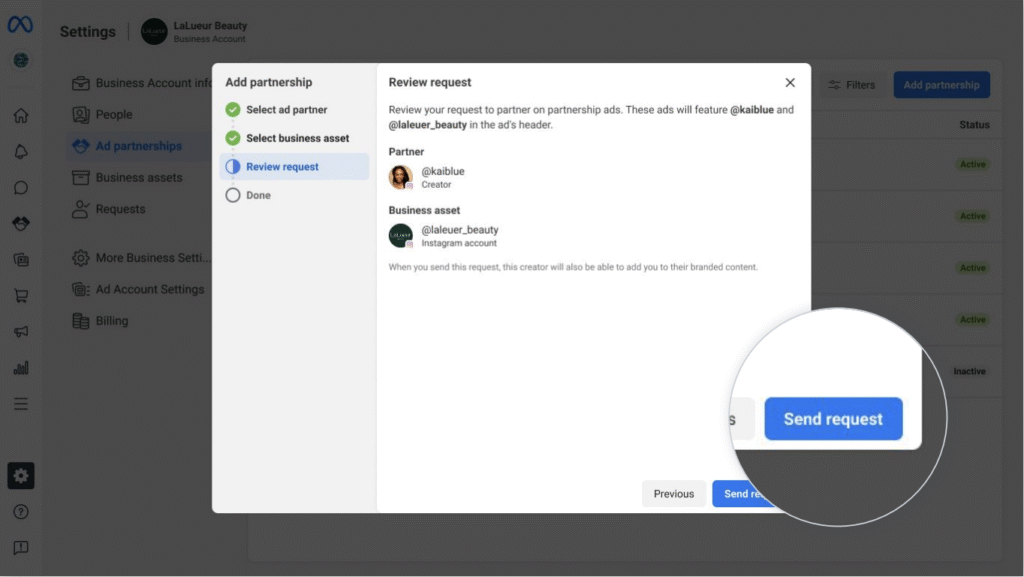
STEP 1 – Getting started with account-level permissions (Advertiser Step)
Advertiser requests account-level permissions from partner in Meta Business Suite.
1. Log into Meta Business Suite at https://business.facebook.com/latest
2. Choose Settings > Ad partnerships to get to the ad partnerships tab.

3. Click on “Add partnership” to get started. to the ad partnerships tab.
4. Search for the partner’s username and select their account.
5. Select the Facebook Page and Instagram account that you want the partnership to be established with.
6. Make sure the partnership ads permission is toggled on.
7. Confirm the partner and business that you are looking to establish a partnership between, then click “Send request.”
8. The request to the partner has been sent. They will be notified and can accept the request in the Instagram app.
STEP 2 – Accepting account-level permissions in-app (Partner Step)
Partner accepts permission request in the Instagram app.
1. Visit Settings and tap Creator or Business
2. Tap Partnership ads

3. Tap Ad partners
4. Tap the pending request
5. Tap Approve

Option 2. Post-Level Permissions (Partner-initiated)
With post-level permissions, partners can give advertisers permission to promote an individual post as a partnership ad. Partners grant post-level permission to an advertiser by toggling on permission in post settings, or by sharing the Instagram partnership ad code.
Advertisers can:
• Create ads from a partner’s existing branded content posts on Facebook or Instagram when the “allow brand partner to boost” toggle is turned on and they are tagged in the paid partnership label.
• Create ads from any Instagram post (regardless of whether the post is branded content or if the advertiser is tagged) when a partner shares the Instagram partnership ad code.
Partners can:
Choose which posts an advertiser is permitted to promote as a partnership ad from their handle.
Way 1 – Post-level Settings (Partner Step)
Turn on the “allow brand partner to boost” toggle to give ad partners permission to boost your branded content as partnership ads. Available on Instagram and Facebook
- Create a post and tap Advanced settings
- Under Branded Content, tap Add paid partnership label
- Toggle on Add paid partnership label
- Tap Brand partners
- Add your brand partner
- Toggle on allow brand partner to boost

Way 2 – Partnership Ad Code (Partner + Advertiser Step)
Share the partnership ad code to give ad partners permission to boost ANY of your content as partnership ads. Available on Instagram only
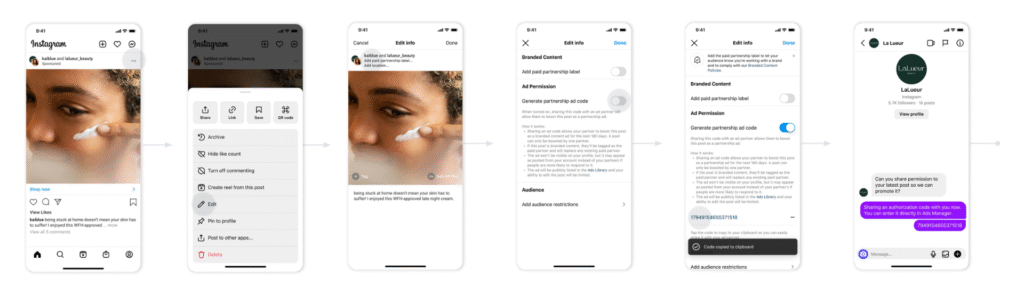
Partner Step
- In the Instagram app, navigate to the existing post that you want to turn into a partnership ad.
- Tap the three dots in the top right corner of the post and tap Edit.
- Tap Add paid partnership label at the top of the post.
- Turn on the Generate partnership ad code toggle. Turn on the Add paid partnership label toggle if the post is branded content.
- Tap the code to copy it to your clipboard.
- Share the code with the advertiser.
Final Thoughts
Meta Partnership Ads are one of the biggest opportunities for brands in 2025. They combine the trust of creator content with the precision of Meta’s ad targeting. For businesses in Malaysia — especially in F&B, lifestyle, home & décor, and e-commerce — they’re a cost-effective way to reach new audiences while building credibility.
Instead of asking “Do Facebook and Instagram Ads still work?”, the better question is: “How can I use Partnership Ads to make them work better?”
👉 In 2025, the brands that win will be the ones that collaborate smartly, not just advertise loudly.
