Home » Blog » ChatGPT Business Profile is now in Malaysia: How to Claim It and What You Get Access To
ChatGPT Business Profile is now in Malaysia: How to Claim It and What You Get Access To
⏱️ 15min read
Table of Contents
This feature, currently in Beta launch since November 2026, aims to let businesses manage how their brand appears in AI conversations. However, few businesses have claimed their profiles. If you wish to manage how your brand appears in ChatGPT, this should be your first move.
What is ChatGPT Business Profile?
ChatGPT Business Hub (chatgpt.com/business-hub) is the official tool for businesses wishing to set up within ChatGPT. It allows businesses to claim their profile, edit public information, link a product feed and view Insights on how the brand appears in AI conversations.
Note: ChatGPT Business Plan is separate to this. ChatGPT Business (paid) refers to a team plan. This Business Hub allows businesses to manage how their brand appears in ChatGPT, when people make queries or searches in ChatGPT relating to their category.
Similar to Google Business Profile, ChatGPT Business Hub lets businesses manage how they appear in AI searches. Whereas Google Business Profile helps you appear in Google Search and Maps, ChatGPT Business Hub helps you appear in conversations within ChatGPT. However, this is still a very new platform so claiming your profile early means that you'll be ahead of the vast majority of businesses in Malaysia, as few have done this yet. OpenAI officially announced the feature in November 2026.
Overview, Agent Builder (only available to eligible businesses to create a customer facing agent) and Products (link product feed if selling products online) are the three sections of the hub.
Why You Should Claim It Now
As described above, there are over 300 million active users every week in ChatGPT. If any user is searching for services, comparing between service providers, or researching a purchase within ChatGPT, ChatGPT will provide an answer including any relevant businesses in that category. If you don't have a claimed profile, you have no control over what is displayed. For businesses running a full-funnel performance marketing strategy, AI visibility is quickly becoming a channel that cannot be ignored.
By claiming your ChatGPT Business Profile, you have control over how your business appears in AI search results. You can ensure that your business name, category, description, contact information and service info are accurate. If you're running ChatGPT Ads, having a claimed profile with completed information will provide a good organic base for your ads to appear with.
Why Now Matters
The ChatGPT Business Hub was launched in Beta in November 2026. At this point in time, most businesses have not claimed their profile. Getting your Business Profile claimed as soon as possible will mean that you can gather insights data early, and also, will mean that there has been longer for the accuracy of your business data in OpenAI's system to be built up before competition increases.
Benefits of Claiming Your ChatGPT Business Profile
✅
Verification
Once you have been verified by OpenAI, a verification badge appears on your profile. This tells ChatGPT that the information within this profile is accurate and managed by the business owner.
📊
Insights
Only verified owners can view insights. This dashboard shows how many times your business has been mentioned in conversations in ChatGPT and the topics that these mentions revolve around.
📋
Manage Business Info
You can edit the category, description, contact info, delivery/return info and images of your profile. This ensures that accurate and updated information about your business is being shown in ChatGPT.
👥
Invite People
Within this tool, you can invite multiple people (including agencies) as Admins. This means that if you have a marketing agency, they can manage your profile for you without having access to your personal OpenAI Account.
📣
Better Brand Visibility
A claimed and verified profile signals to OpenAI that your business information is accurate. This gives ChatGPT more reliable data to draw from when recommending or mentioning your brand in conversations.
🤖
Business Agent (Eligible Businesses Only)
If eligible, you can create a 'Business Agent' within ChatGPT. This is a labelled chat, where customers can ask questions and receive answers based on your business information. It acts like an AI first line of support.
How to Claim Your ChatGPT Business Profile
The process takes place at chatgpt.com/business-hub. You will need a ChatGPT account, your business website, and access to either your business phone number, business email, DNS settings for your website domain, or a Shopify account for verification. Here are the steps.
1
Step 1 of 8
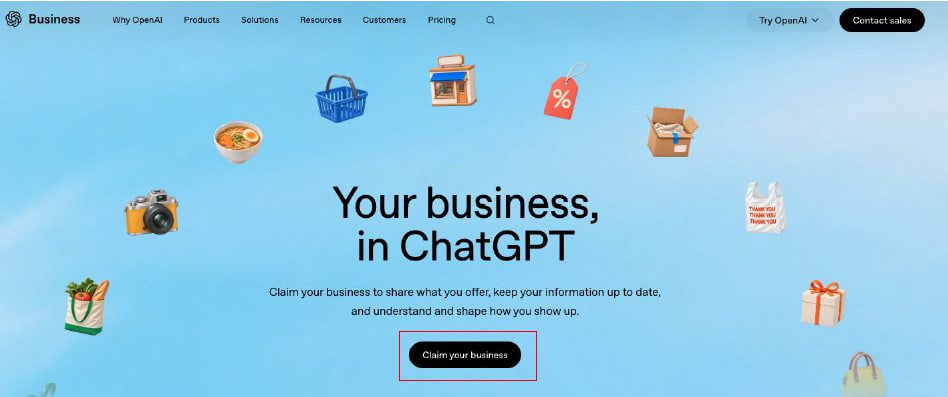
Navigate to ChatGPT Business Hub
You will be prompted with the "Your business, in ChatGPT" page. To begin, press the black button, 'Claim your business'. Ensure that you are already logged into the ChatGPT account you wish to be using for ownership of this business.
2
Step 2 of 8
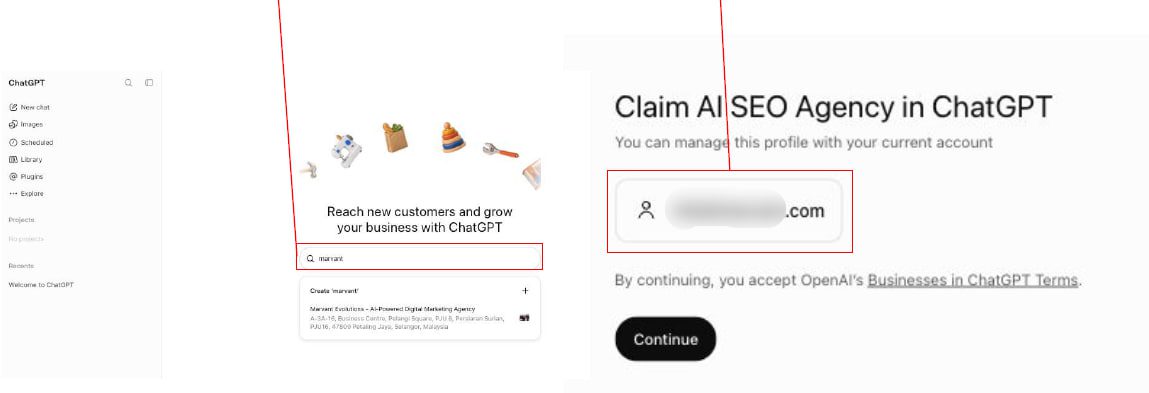
Search for Your Company and Confirm Your Email
From here, a pop-up will appear. Please type in the name of your business and select the correct business from the results. As ChatGPT has existing knowledge of businesses, you should find your business quickly. Once selected, you will be prompted with a confirmation pop-up. Make sure the email below your business name matches the email that you are currently logged into. This email will be the main account for your Business Hub. If it is incorrect, please go back, log out, and login with the correct company email. Once correct, click Continue.
3
Step 3 of 8
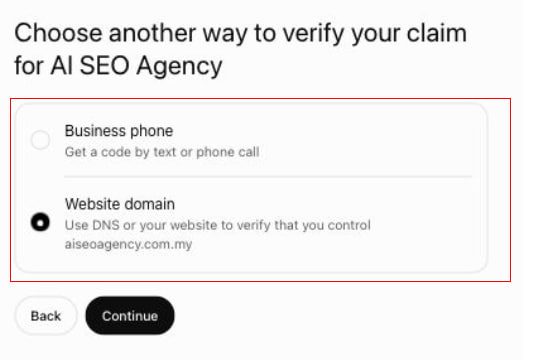
Choose How to Verify Your Business
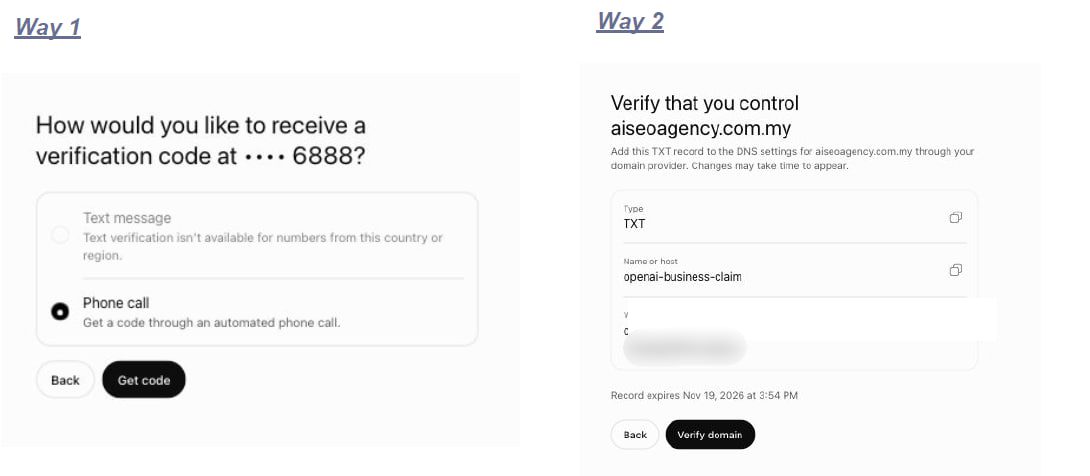
To verify your business, you must choose the method of verification. There are two methods. Business phone: receive a one-off code via text or phone call to the business phone number. However, it is possible that text messages may not be offered in your country (such as in Malaysia) meaning only phone calls may be offered as a verification method.Website domain: verify ownership by adding a TXT record to your domain in the DNS. This method is more reliable, and does not rely on phone lines. If you are able to access DNS settings for your domain from your host, or domain provider, we recommend using this method.
4
Step 4 of 8
Complete the Verification
Depending on the verification method you selected, follow these steps. Business phone: select either 'Text message' or 'Phone call'. Then press 'Get code'. Enter the code you receive. Website domain: a unique TXT record will be generated. It will show a record name (openai-business-claim), record type (TXT) and a value (unique alphanumeric string). Log into the domain provider or DNS manager for your website and add this exact record. Once added, go back to ChatGPT and press 'Verify domain'. Important: please make sure to do this quickly, as there is a time limit on this record (listed on screen). Although it is standard for TXT records to propagate very quickly, it can take a few minutes depending on your provider.
5
Step 5 of 8
Claim Submitted: Your Business Is Now in Review
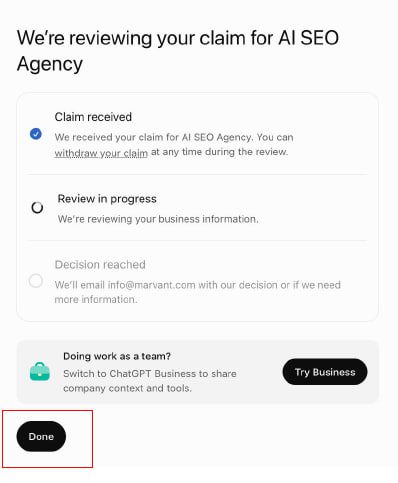
Once verified, you will be shown a confirmation screen. It will show 3 parts: 'Claim submitted' (completed), 'Being reviewed' and 'Decision made'. This means that OpenAI have received your business claim, and are currently reviewing it. It will also state that they will send an email to the email address provided on this account, to let you know what the result was, or if any further information is required. You do not need to stay on this screen. Press 'Done', and check your email over the next hours or days. As this part of ChatGPT is still in beta, times may vary. You may also be prompted to try ChatGPT Business. This is a paid version for teams and is optional.
6
Step 6 of 8
Return to Business Hub and Open Your Profile
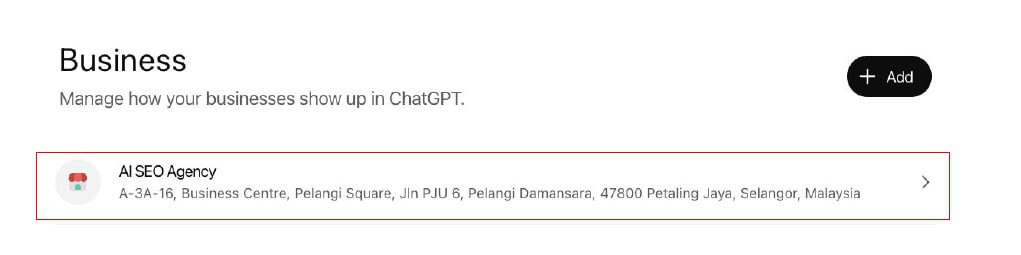
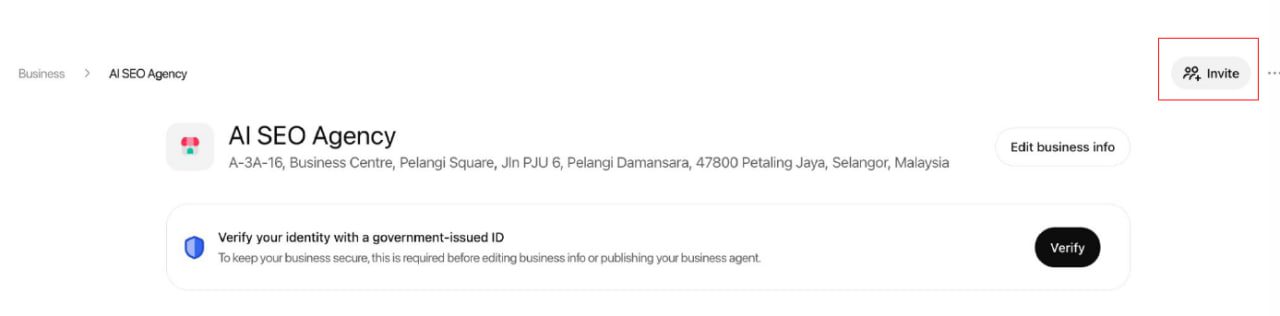
After around 10 minutes (or sometimes quicker), go back to the Business Hub on chatgpt.com/business-hub. Under the Business section, you should see your business with the name and address. This means that the business has been successfully claimed under your account. However, you can only make basic changes within this hub. To make more changes, click on your business. You will then be taken to a dashboard. Within this, you can view business information, verification status, and make edits once identity verification has been completed in the next step.
7
Step 7 of 8
Complete Identity Verification via Persona
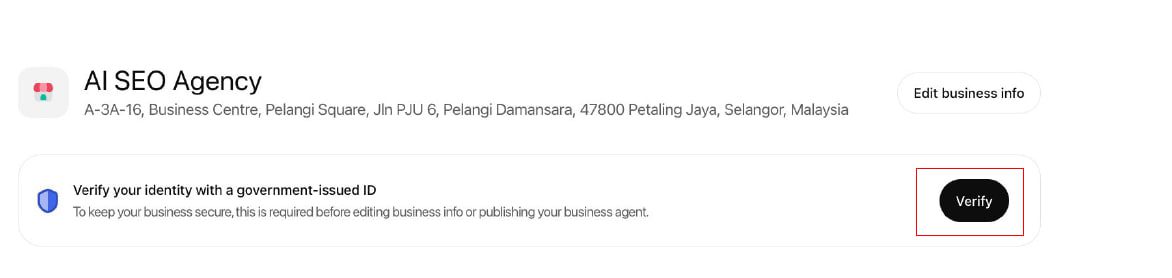
Within your Business Hub, you will be prompted with the message "Verify your identity with a government-issued ID." This is compulsory. If you do not complete identity verification, you will be unable to make any changes to business information, or create a Business Agent. Press 'Verify' to begin. You will be redirected to Persona, a third party verification service. You may be asked to provide a Government issued photo ID (such as MyKad, Passport or Driver's license), Proof of business registration, and Proof that you are an authorised representative of the business. Once Persona has verified your information, and it is approved by OpenAI, you will be given a verified tick on your profile. At this point, you will be able to make changes to business information, and will have full access to data from ChatGPT Insights.
8
Step 8 of 8
Invite Your Team or Marketing Agency
Once your profile is setup, it is recommended that you grant people access to this profile. In the top right hand corner of your profile, press the invite button. On this screen, you can invite people in your team, or external marketing agencies to be admins. Admins can make changes to business information, manage the product feed, and view Insights. They do not require access to your personal ChatGPT/OpenAI account. This is the safest way of allowing other people to manage your profile. If you are working with Marvant (or another agency) to improve your visibility in AI, we would recommend inviting them as admins so they can manage it directly on your behalf.
What to Do Once Your Profile Is Live
Once your business has been approved by OpenAI, and Identity verification completed, the following steps are recommended.
Post-Claim Checklist
1. Update business description Ensure that the business description is clear and accurate. ChatGPT uses this information to answer questions in relation to the category of your business.
2. Complete all contact/service information Make sure to include your website, telephone number, address and business category. If incomplete, there will be less information for ChatGPT to use.
3. View Insights (after 7 days) After 7 days of data being collected, view Mentions and Discovery Topics. This will give you insights into what questions are showing your business in AI conversations.
4. Invite in your agency/team If your digital presence is being managed by someone else in your team, or by an external team, we recommend inviting in an admin to update this profile. Press invite in the top right hand corner of the profile, and make the person an admin. This grants them full access to edit business information, manage product feeds and view Insights. They do not need access to your personal ChatGPT/OpenAI account. This is the safest way to allow someone to manage the profile. If you are working with Marvant (or another agency) to manage your AI visibility, by adding them as admins here, they can manage your profile on your behalf.
What Data Can You Actually See in ChatGPT Insights?
Once verified and claimed, data will be available in Insights. This is a very useful tool to understand how your business is doing in AI. Data can be viewed as 7 day data, or 28 day data.
💬
Mentions
If you are an online business, Mentions occur when a link to your website is included in a conversation. Mentions do not occur from simply including your brand name. If you are a local business, a mention occurs when your location is included in a local result. This lets you know how many times ChatGPT is citing your business.
🖱️
Website Clicks
The total number of clicks from ChatGPT to your website. It is worth noting that this data does not guarantee website visits or conversions. Therefore, it can be a useful piece of data to pair alongside your own direct traffic data.
🔍
Discovery Topics
The top 5 general topics from conversations mentioning or citing your business. This includes the number of mentions from this topic, and % share of mentions. This lets you know what questions are getting your brand into ChatGPT. For example, if you are an interior design company, you may see the topics "tips for renovating my home" or "kitchen design Malaysia".
What Data Can't Be Seen
You cannot see individual queries or conversations, data related to competitors, or sentiment. You also cannot see what position you got in the responses, how accurate information in the responses were, or mentions without a link included. This data is only for ChatGPT and does not include other AI's such as Perplexity and Gemini. This should be considered as just one piece of data in a wider strategy to monitor GEO.
Need Help With Your AI Visibility?
Claiming your ChatGPT Business Profile is the first step. Making sure the AI is recommending you is the next one. We can help with both.
ChatGPT Business Hub is OpenAI's dashboard that allows business owners to claim their business listing inside ChatGPT, manage their public profile, connect a product feed, and access Insights data showing how their brand is being mentioned in AI conversations. It launched in beta in November 2026.
Yes. Claiming and managing your ChatGPT Business Profile is free. No Ads account or Enterprise agreement is required. You simply need a website that you own or are authorised to represent.
Not directly. OpenAI states that claiming your listing does not guarantee increased visibility or give you direct control over what ChatGPT recommends. However, it allows you to ensure your business information is accurate, which forms part of the evidence the AI draws on. The more accurate and complete your profile, the better the foundation for your AI visibility.
Insights shows mentions (when ChatGPT references your website), website clicks, and discovery topics, which are the broad themes in conversations where your business was mentioned. Data is available in 7-day or 28-day views. Individual conversations, competitor data, sentiment, and your position in answers are not shown.
After submitting your claim, you need to pass identity verification through Persona, which may require a government ID, business registration details, and proof of authorisation. The timeline depends on OpenAI's review process. The feature is currently in beta so processing times may vary.
Eligibility depends on industry, location, and OpenAI's checks. The platform launched in beta in November 2026 and is expanding. Malaysian businesses with a website should attempt the claim process at chatgpt.com/business-hub to check their eligibility.
If your business does not appear when you search in Step 2, it likely means OpenAI does not yet have enough data about your business in its knowledge base. This is common for newer or smaller businesses. In this case, focus first on building your online presence: ensure your business is listed on Google Business Profile, has consistent NAP (name, address, phone) information across directories, and has a website with clear information about what you do. As ChatGPT's business data expands, your listing should become available. You can retry the claim process at a later date.
Jiayi Gan is the CMO at Marvant Evolutions, with experience spanning startups & leading 4A MNC advertising agencies. She has managed multi-million-ringgit advertising investments across Google, Meta, and TikTok for businesses across multiple industries. Today, she leads AI-powered marketing initiatives across SEO, AIGC, marketing automation, and performance media, enabling brands to improve search visibility, scale content production, and accelerate business growth.