In October 2026, Google rolled out Channel Prioritisation and Budget Allocation controls for Performance Max campaigns. For the first time, advertisers can now set channel groups to High or Low priority and cap how much of their daily budget is spent on lower intent channels like Display and Search Partners.
What is Google Performance Max?
Google Performance Max (PMax) is a goal-based campaign type that runs across all of Google's advertising channels from a single campaign. Launched fully in 2022 as a replacement for Smart Shopping and Local campaigns, PMax uses Google's AI to automatically serve ads across Search, YouTube, Display, Discover, Maps and Gmail simultaneously. Advertisers provide the creative assets (images, videos, headlines, descriptions), audience signals and a conversion goal, and Google's machine learning decides where, when and to whom to show the ads to maximise conversion value.
PMax is designed to find conversion opportunities that a manually managed campaign might miss by combining signals across channels and formats in real time. It has become Google's default recommendation for most advertisers running conversion-focused campaigns in Malaysia and globally. If you are working with a Google Ads agency, Performance Max is likely already part of your campaign structure.
Pros and Cons of Google Performance Max
- Single campaign covers all Google channels, reducing setup complexity
- AI optimises across signals in real time, often finding conversions human management would miss
- Access to inventory not available in standard campaign types (Discover, Maps, Gmail)
- Adapts creative combinations automatically based on what performs
- Useful for scaling spend efficiently once conversion data is established
- New channel and budget controls (October 2026) address the biggest historical weakness
- Limited visibility into which individual channels or placements drive results
- Budget has historically flowed into low-intent channels like Display without control
- Cannot separate Search from YouTube or Maps within the same campaign
- Requires sufficient conversion volume to learn effectively (typically 50 or more per month)
- Can cannibalise existing Search campaigns if not structured carefully
- Can suppress branded Search traffic if not paired with a separate branded Search campaign
- MCC/manager accounts cannot apply channel settings; must be done per client account
Why budget control in Performance Max was an issue
Before October 2026, Performance Max gave advertisers very little control over where their budget was spent. The AI decided everything: which channels to prioritise, how much to allocate to Display versus Search, and when to shift spend between surfaces.
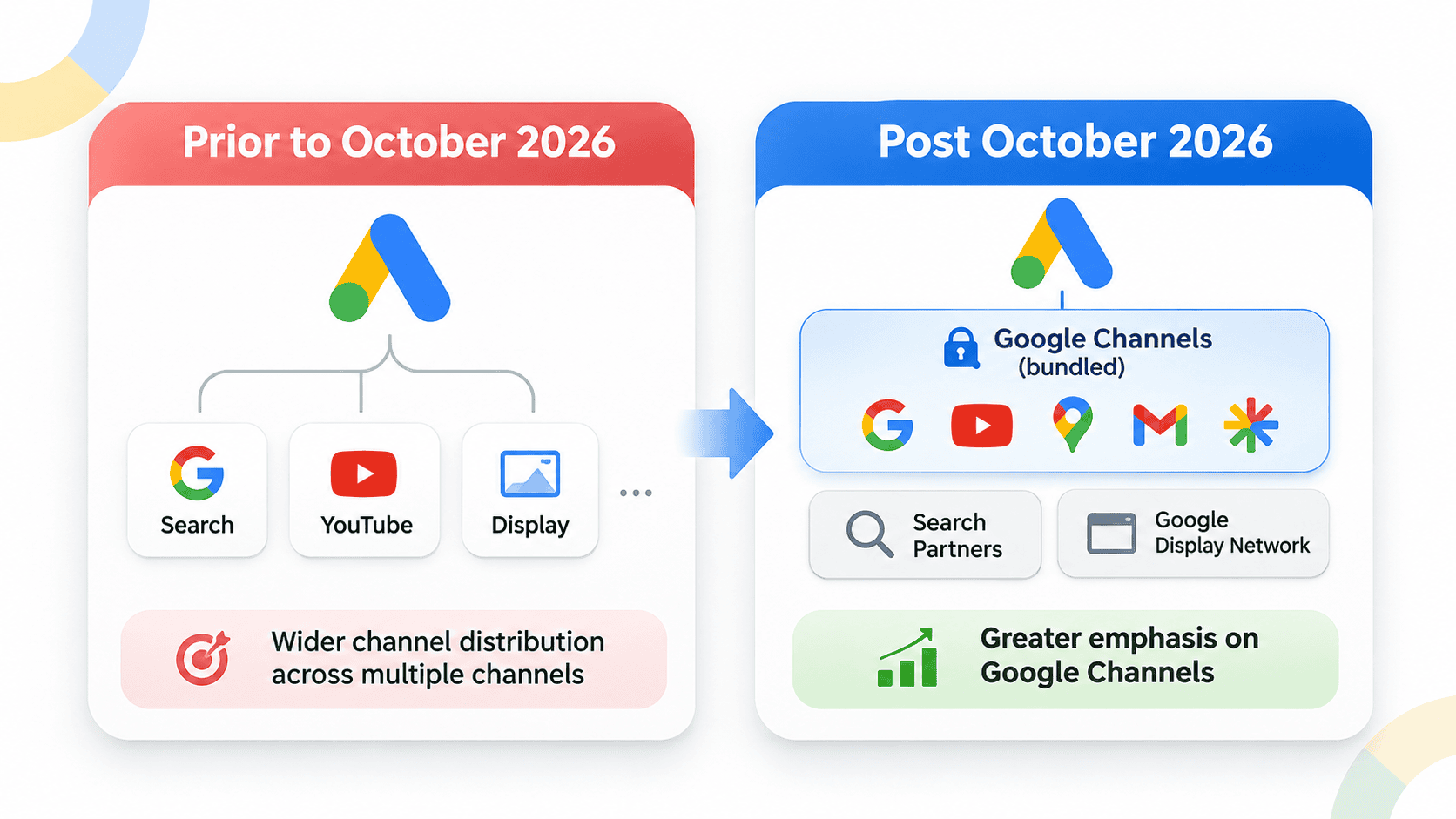
This feature meant that many people had an issue. The different Google channels (Search, YouTube, Maps, Gmail and Discover) were grouped together. As Display and Search Partners weren't capped individually, budget often flowed into lower intent channels. This has led to a large volume of poor quality leads within lead generation industries (real estate, education, home services). Within Display channels and mobile app clicks, many conversions are recorded, but rarely convert into actual customers.
- Automatic Budget Allocation across all channels
- No way to prioritise or cap budget within channels
- Display and Search Partners were not capped
- Only exclusions could be applied to placements
- Poor quality leads from Display were included in CPA data
- Ability to assign "High" or "Low" priority to channel groups
- Within Budget Allocation settings, cap spending in low priority channels (as a %)
- Setting the value to 0% effectively stops this channel group from running
- Settings can be applied to account level, shared budgets, or campaign level
- Channels marked as "High" priority will receive priority in spending when reaching target CPA/ROAS
This functionality was first seen being tested in an Alpha version of Google Ads in August 2026. It allowed individual priorities to be set for Search, Search Partners, Discover, YouTube, Maps, Gmail and Display. It was officially rolled out on the 15th October 2026 with a simpler format: the ability to set channel groups to either "High" or "Low", and put a cap on low priority channels (with the cap as a %).
What has changed in Performance Max
2 new features in Performance Max, with a gradual roll-out from 15th October 2026:
Channel Prioritisation
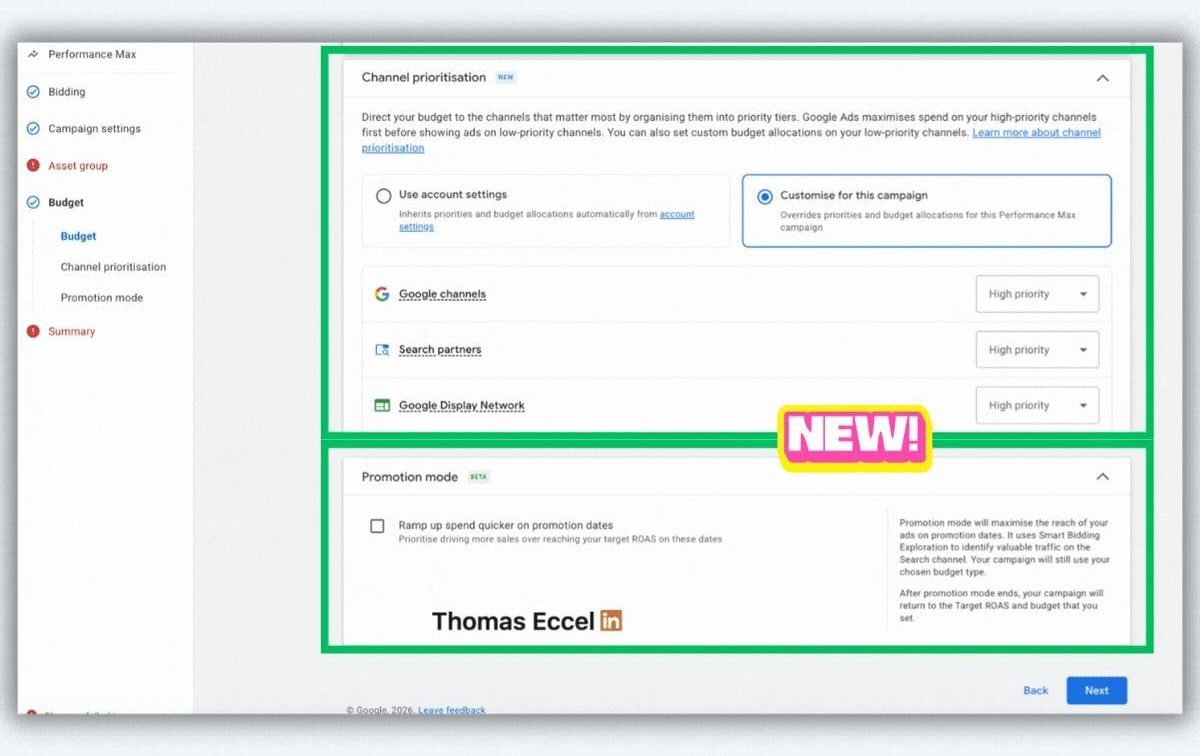
By default all channels in PMax campaigns have a High priority. However, it is possible to set individual channel groups to have a Low priority. Doing this means that Google will allocate more budget to High priority channels. Channel groups include:
| Channel Group | Channels Within | Can be Set Individually? |
|---|---|---|
| Google Channels | Search, YouTube, Maps, Gmail, Discover | No, all Google Channels are grouped together |
| Search Partners | Third party search sites with Google ads | Yes |
| Google Display Network | Banners / Responsive Ads on websites & apps | Yes |
Within the Google Channels group, you can no longer differentiate between Search, YouTube and Maps. If you want to increase spend in Search and reduce spend in YouTube, this can no longer be done with this setting. You would need to run separate campaigns.
Budget Allocation
Once a channel group is set to Low priority, you can cap how much of your average daily budget it can spend, expressed as a percentage.
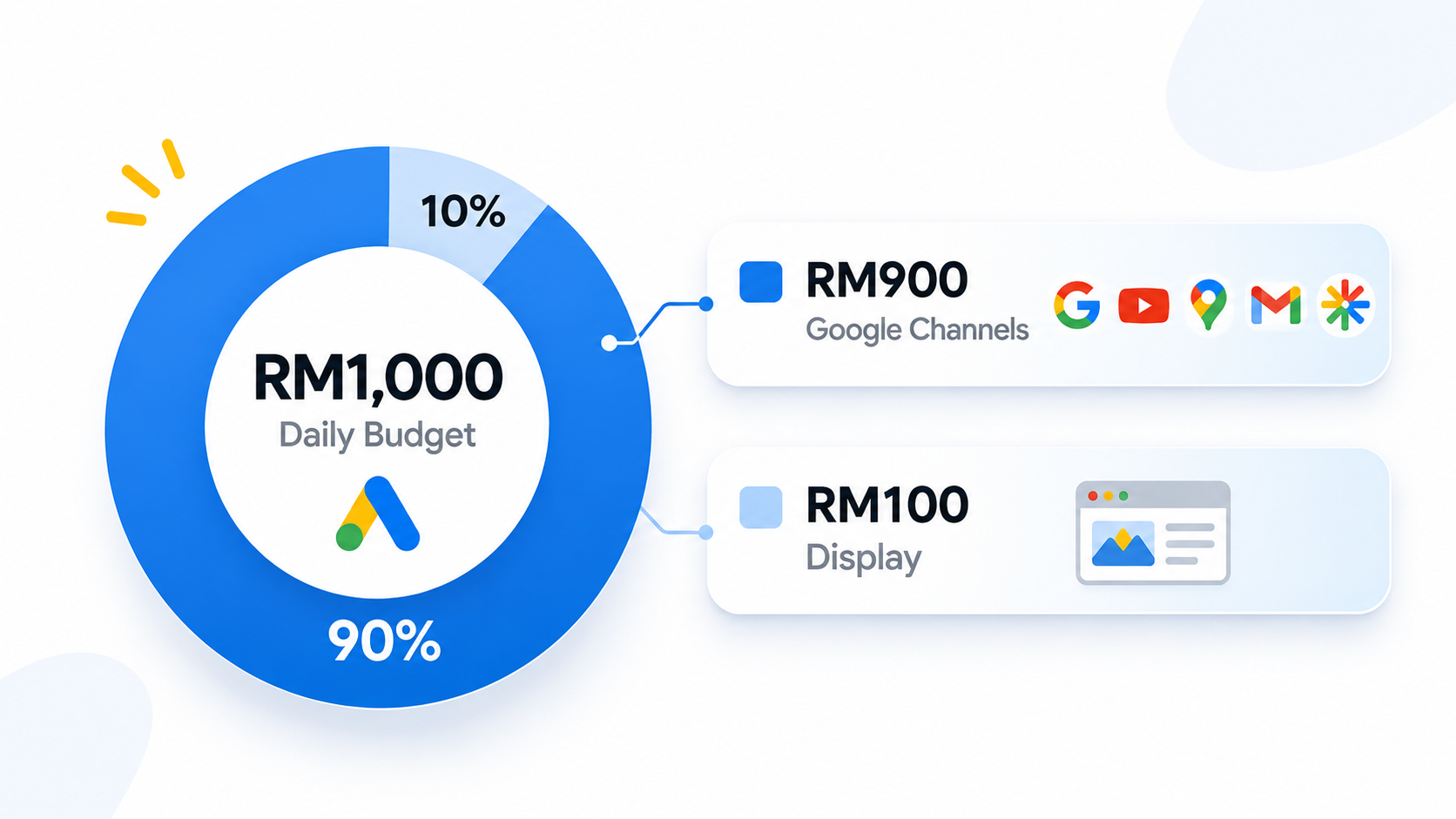
In a campaign with a daily budget of RM1,000, if Display Network is set to Low priority with a 10% cap, Google will try to spend up to RM100 in Display. If 0% is selected, Display will be paused completely in this campaign.
Budget caps work on a best efforts basis and Google may overspend slightly. Any deficit or overspending will not be rolled over to the next day. Caps are calculated daily from your daily average budgets. For campaigns using Smart Bidding such as Target CPA or Target ROAS, Smart Bidding will still take precedence for uncapped channels, but selecting priorities will place additional constraints on how budget is distributed.
Settings can be applied at three levels: your account (as a default for all campaigns), via shared budgets, or individually per campaign. It is recommended to adjust your account-level defaults first. Note that these settings cannot be adjusted from a Manager (MCC) account and must be set within each individual client account. Support for making these changes via Google Ads Editor or the API was announced as coming soon, so check the current support status before attempting any bulk updates.
Promotion Mode
As well as adjusting the channels within PMax, another new feature is Promotion Mode. This allows advertisers to increase daily budgets during promotional periods (or peak seasons) by lowering the ROAS target. Once the promotion period is over, the campaign will return to the original target. For Malaysian advertisers, this is applicable if you are running campaigns during 11.11, 12.12 and Hari Raya periods.
Implications for Malaysian advertisers using PMax
For most lead generating businesses in Malaysia (home renovation, interior design, clinics, education, property) this means that it is now viable to reduce spend in searches and displays without stopping PMax. This is a significant improvement for anyone running performance marketing in Malaysia.
We would recommend starting with Google Channels set to High, and Search Partners and Display set to Low with a cap between 5 to 10%. This means that most of the budget will be spent in intent driven channels (Search, YouTube and Maps), but a small amount will be spent in Display. A small amount in Display channels is important so remarketing can be done to drive conversions in searches. If Display is reduced to 0%, remarketing reach may be reduced and may impact attribution in campaigns where assisted conversions are important.
Use the channel performance report to understand how your Display channels have been performing in the last 60 to 90 days. Compare lead data from Display to CRM to determine whether these leads became paying customers. If you are receiving poor quality, inexpensive leads from Display, we recommend capping the spend in Display. If ecommerce sales or awareness for future conversions in searches is being achieved from Display, we recommend a cautious approach.
Recommended Order of Adjustments
To ensure consistency across your account, we recommend the following order when making adjustments:
- Within Account Settings, go to Budget, then Channel Prioritisation. If the card is not visible yet, the feature has not rolled out to your account. Check again in a few days as access is being granted gradually. Note that "Channel Prioritisation" will not appear for all campaigns in your account at once.
- Take note of how your Display and Search Partners spend is distributed across campaigns.
- Set your default at the Account level. This can be done by going to Account Settings then Channel Prioritisation. This configuration will be applied to all applicable campaigns in the account.
- Adjust the channel prioritisation for specific campaigns. In an Ecommerce account, for example, you may wish to have Display prioritised to "High" in some campaigns, and prioritised to "Low" in your Lead Generation campaigns.
- Once implemented, leave your prioritisations in place for one billing cycle. Compare costs per conversion and volumes by channel, and consider making further changes.
When Not To Apply Channel Prioritisation
It may be detrimental to apply channel prioritisation in certain accounts. Consider the following scenarios:
Consider leaving the changes in place for 2 to 3 weeks before reviewing. Consider your successful KPIs as cost per quality lead or cost per sale, rather than cost per conversion. Early industry insights suggest that limiting Display and Search Partners in PMax campaigns can decrease conversion volume slightly. However, the quality of leads increases. Therefore, within most service based businesses, this trade off is acceptable.
February 2027 Update
Another change to consider within Google Ads is coming in February 2027. Whilst this change does not affect Performance Max campaigns, it does affect Search campaigns. From February 2027, the budget distribution within Display Expansion (i.e. Display Network placements for Search ads) will be updated.
To avoid change in spend pattern, it is recommended to set Display Network to Low Priority, with a 50% allocation in impacted Search campaigns. From February, Display Network will also no longer be served in Search campaigns with "Target Impression Share".
This change should be highlighted to clients with Display Expansion enabled in their Search campaigns. As this change is automatic, it is best to set the recommended changes now in anticipation of the change.
To understand how these changes fit into your overall Google Ads structure, or to discuss how paid search and organic search visibility work together, speak with our performance marketing team.
Sources: Affect Group: Google Ads Channel Prioritisation & Budget Allocation 2026 · Topkee: Google Ads Performance Max Setup with Channel Prioritisation · BW Digital: Performance Max Channel Controls & Budget Capping
Performance Max
We can assess your Google Ads structure to ensure that within Performance Max campaigns, your budgets are being spent efficiently, and not wasted on low quality Display channels.
Contact Us